Test Your Apple Pay Card
Not sure if your Apple Pay is set up correctly? Use this page to verify Apple Pay works with a real $1 transaction. You'll be charged $1 USD and receive instant confirmation that your payment method is functioning properly.
This is perfect for checking if Apple Pay works before making larger purchases, testing a new card you just added to Apple Wallet, or confirming your payment setup is correct.
How to Test Apple Pay
- Click the Apple Pay button above
- Authenticate with Face ID, Touch ID, or your device passcode
- Your card will be charged $1.00 USD
- You'll see instant confirmation if your payment goes through
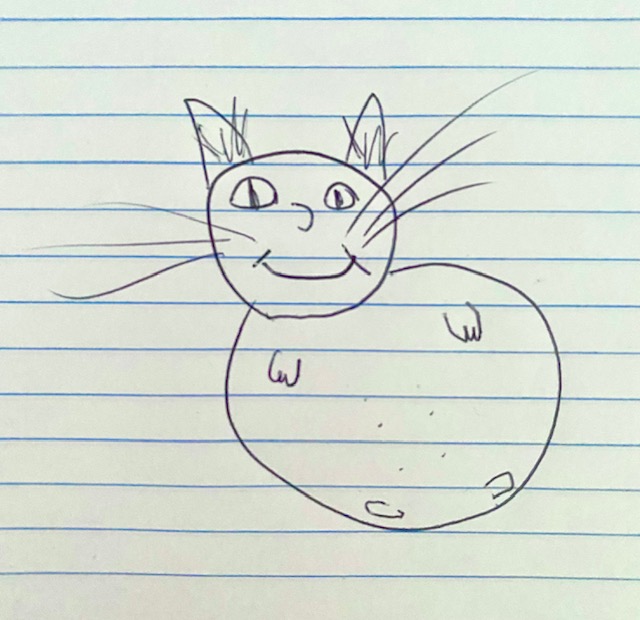
- Receive a bad drawing of my cat as proof of purchase
Important: This is a real transaction - you will be charged $1. This ensures you're getting an accurate test of whether your Apple Pay card works correctly.
Requirements to Test Apple Pay
- Safari browser on iPhone, iPad, or Mac
- Apple Pay enabled on your device
- A valid card added to Apple Wallet
- Your card must support Apple Pay transactions
🔒 Secured by Stripe • Over 10,000 successful test transactions
Frequently Asked Questions
Will I really be charged $1?
Yes, this is a real transaction. You will be charged $1.00 USD to your card through Apple Pay. This verifies your payment method is working correctly.
Is this safe and secure?
Yes, all payments are processed securely through Stripe, one of the world's most trusted payment processors. We never see or store your card details. Apple Pay adds an additional layer of security by not sharing your actual card number with merchants.
What devices support Apple Pay?
You need Safari browser on iPhone (6 and later), iPad (Air 2 and later, Mini 3 and later), or Mac with Touch ID. Your device must have Apple Pay enabled and at least one card added to Apple Wallet.
Why won't Apple Pay work for me?
Common issues include: using a browser other than Safari, Apple Pay not set up on your device, no cards added to Apple Wallet, or your card doesn't support Apple Pay. Make sure you're using an Apple device with Safari browser. See our
troubleshooting guide for more help.
What do I get after payment?
After successful payment, you'll receive instant confirmation that your Apple Pay works and a downloadable bad drawing of a cat as proof of purchase.
Can I test Apple Pay without being charged?
No, to truly verify your Apple Pay card works, a real transaction must be processed. This is the only way to confirm your card is active and approved for purchases. However, $1 is the minimum amount to provide you with certainty.
Is this for developers testing Apple Pay integration?
No, this service is designed for regular users who want to check if their Apple Pay card works. If you're a developer, you should use Stripe's test mode or Apple's sandbox environment.
How bad is the drawing?
Art is subjective. No refunds for anyone who finds the drawing to be amazing.
Why not have a good drawing?
I can't draw.
Why Test Your Apple Pay?
There are many reasons you might want to verify Apple Pay is working correctly. Maybe you just added a new card to Apple Wallet and want to make sure it's active. Perhaps you're about to make a large purchase and want peace of mind that your payment will go through. Or maybe Apple Pay hasn't been working at stores and you want to check if the issue is with your card or the merchant's terminal.
Whatever your reason, this simple $1 test transaction gives you instant confirmation that your Apple Pay setup is functioning properly.
 Download